Enhancing Digital Art with the Cactus Doodle Stamp Brush for Procreate
In the rapidly evolving landscape of digital illustration, efficiency and aesthetic versatility are paramount. For artists, designers, and hobbyists using the iPad, finding tools that streamline the creative process without sacrificing quality is a constant pursuit. One such tool that has gained attention for its specific utility and charm is the Cactus Doodle Stamp Brush for Procreate. This digital asset is not merely a collection of images; it is a functional brush set designed to integrate seamlessly into the Procreate ecosystem, offering users a quick and effective way to add botanical elements to their projects.
Understanding the value of this tool requires looking beyond its surface-level appearance. It represents a shift in how digital creators approach repetitive design elements. Instead of drawing each spine, leaf, or pot from scratch every time a cactus illustration is needed, users can leverage pre-made stamps that retain the hand-drawn feel while significantly reducing production time. This article explores the features, applications, and practical considerations of using this specific brush set, providing a comprehensive overview for both novice and experienced digital artists.
The Mechanics of Digital Stamping
To fully appreciate the Cactus Doodle Stamp Brush for Procreate, it is essential to understand how stamp brushes function within the Procreate application. Unlike standard painting brushes that lay down pigment based on pressure and tilt, stamp brushes place a predefined image onto the canvas with each tap. This mechanism is particularly useful for creating patterns, filling backgrounds, or adding detailed accents without the fatigue associated with manual repetition.
The core advantage of this specific set lies in its transparency. The stamps included in the download feature transparent backgrounds, a critical technical detail for digital compositing. This allows artists to layer the cactus illustrations over various textures, colors, and patterns without worrying about unwanted white boxes or jagged edges. The ability to manipulate these stamps—changing their color, size, and opacity—means that a single brush set can yield hundreds of unique variations. This flexibility ensures that the artwork remains dynamic and personalized, rather than looking like a generic clip-art assembly.
What Is Included in the Package?
When purchasing this digital item, users receive an instant download in a ZIP file format. Understanding the contents helps in setting realistic expectations and preparing the necessary software for installation. The package typically includes:
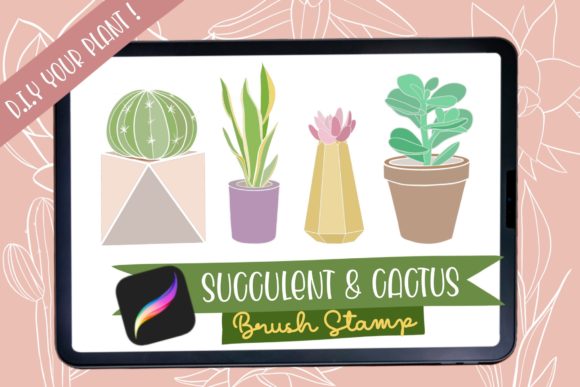
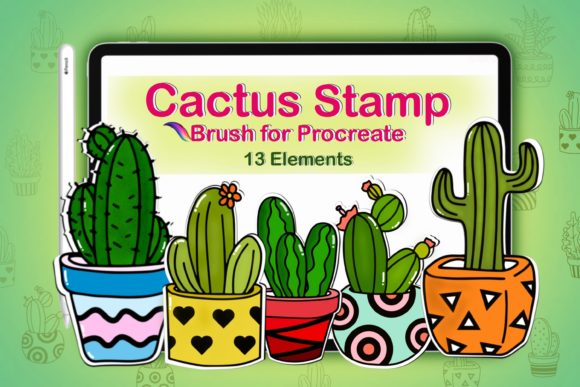
- 13 Unique Stamp Brushes: A curated selection of cactus designs, ranging from simple silhouettes to more detailed doodles with pots and flowers.
- Installation Instructions: A step-by-step guide to help users import the brushes into Procreate correctly.
- ReadMe File: Additional information regarding usage rights, compatibility, and support details.
It is crucial to note that this is a handmade digital item intended specifically for use with the iPad and Apple Pencil within the Procreate app. It is not compatible with Photoshop, Illustrator, or other desktop-based graphic design software. This limitation is not a drawback but rather a specialization, ensuring that the brush engine settings are optimized for the touch interface and pressure sensitivity of the iPad environment.
Practical Applications for Creators
The versatility of the Cactus Doodle Stamp Brush for Procreate extends across various creative industries and personal projects. Its primary appeal lies in its ability to enhance designs quickly, making it an invaluable resource for professionals working under tight deadlines as well as hobbyists looking to elevate their personal art.
Greeting Cards and Invitations
One of the most common use cases for this brush set is in the creation of greeting cards and event invitations. The whimsical nature of "doodle" style art lends itself perfectly to casual, friendly, and warm designs. Whether designing a birthday card, a wedding invitation with a desert theme, or a "thank you" note, these stamps provide instant visual interest. Users can combine different cactus shapes, adjust their colors to match a specific palette, and add hand-lettered text to create a cohesive and professional-looking product.
Digital Planning and Journaling
The rise of digital planning has created a demand for decorative elements that can be easily inserted into digital journals. Procreate is a popular choice for digital planners due to its robust layer management and brush capabilities. The Cactus Doodle Stamp Brush allows users to decorate their daily logs, mood trackers, and habit charts with minimal effort. By using the stamps as decorative borders or bullet points, users can maintain a consistent aesthetic throughout their digital planners without spending hours on decoration.
Social Media Content Creation
For social media managers and content creators, visual consistency is key to brand identity. These stamps can be used to create branded templates for Instagram stories, Pinterest pins, or blog headers. The transparent background feature is particularly useful here, allowing creators to place the cactus elements over photos, gradient backgrounds, or solid colors that align with their brand guidelines. This capability enables the rapid production of high-quality visual content, which is essential for maintaining an active online presence.
Evaluating Suitability and Limitations
While the Cactus Doodle Stamp Brush for Procreate offers significant benefits, it is important for potential users to evaluate whether it fits their specific needs. No tool is universally perfect, and understanding its limitations ensures a satisfactory user experience.
Compatibility Constraints: As previously mentioned, this tool is exclusive to Procreate on the iPad. Users who primarily work on desktop computers or prefer other software suites will not be able to utilize this product. Additionally, users must have a method to unzip the downloaded file. While most modern iPads have built-in file management capabilities, some users may need to download a third-party app to handle ZIP files effectively.
Creative Control vs. Convenience: Stamp brushes prioritize convenience over granular control. While users can resize and recolor the stamps, they cannot alter the fundamental shape of the cactus once it is stamped. For artists who require highly customized, unique botanical illustrations where every spine and curve is manually placed, a standard painting brush might be more appropriate. However, for those who value speed and consistency, the trade-off is highly favorable.
Learning Curve: Although the installation process is straightforward, beginners to Procreate may need to familiarize themselves with the concept of importing brushes. The included instructions are helpful, but users should be comfortable navigating the iPad’s Files app and the Procreate brush library. Once installed, however, the learning curve flattens significantly, as using the stamps is as simple as tapping the screen.
Tips for Maximizing Value
To get the most out of the Cactus Doodle Stamp Brush for Procreate, consider the following practical tips:
- Experiment with Layer Modes: Try changing the blending mode of the layer containing the stamps. Modes like "Multiply" or "Overlay" can create interesting interactions with background textures, giving the cacti a more integrated and organic look.
- Combine with Hand-Drawn Elements: Use the stamps as a base or background element, then add hand-drawn details on top. This hybrid approach maintains the efficiency of stamping while adding the unique touch of manual illustration.
- Create Custom Palettes: Before starting your project, create a color palette that complements the cactus theme. Having pre-selected colors ready allows for quicker experimentation and ensures color harmony throughout your design.
- Utilize Symmetry Tools: Procreate’s drawing guide and symmetry options can be used in conjunction with stamp brushes to create intricate mandalas or patterned backgrounds featuring the cactus elements.
Conclusion
The Cactus Doodle Stamp Brush for Procreate is a specialized digital tool that addresses the need for efficiency and aesthetic charm in digital illustration. By providing a set of versatile, transparent-background stamps, it empowers creators to enhance their projects—from greeting cards to social media content—with minimal effort. While it is limited to the Procreate ecosystem, its integration within that platform is seamless and powerful. For iPad users looking to expand their digital toolkit with resources that balance creativity and productivity, this brush set offers a compelling solution. As with any creative tool, its true value is realized through experimentation and integration into the user’s unique workflow, opening up new possibilities for digital expression.