Evaluating the Snowy Christmas Alphabet Brush Stamps for Procreate
Digital illustration has evolved significantly, offering artists tools that streamline workflow while maintaining creative flexibility. Among these tools are specialized brush stamps, which allow users to insert pre-designed elements directly onto their canvas. The Snowy Christmas Alphabet Brush Stamps by Pakka Design Studio represent a specific niche within this category, targeting creators who need festive typography for holiday-themed projects. This article evaluates the utility, technical requirements, and practical applications of this asset pack to help digital artists determine if it aligns with their current design needs.
Understanding the Asset Pack
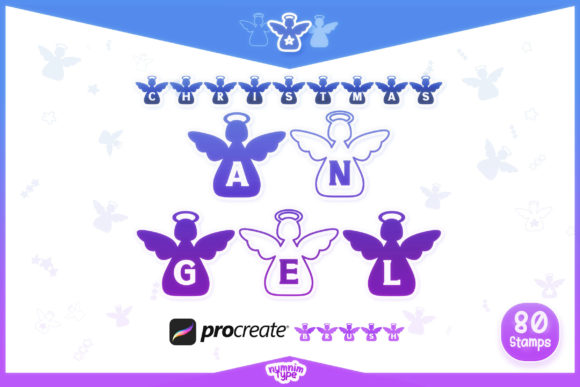
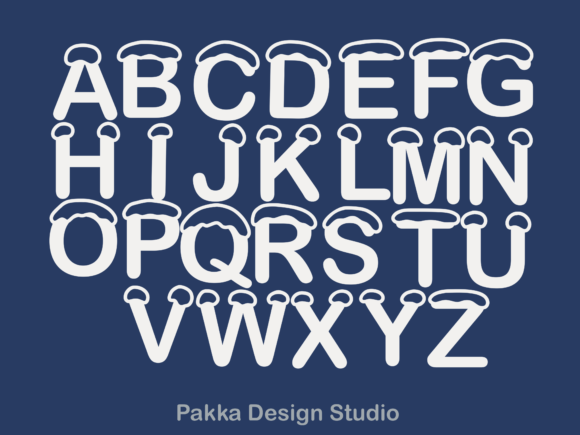
The core product is a set of twenty-six alphabet letter brush stamps designed specifically for the Procreate application on iPad. Unlike standard text tools that rely on system fonts, these brushes function as stamped images. When a user selects a letter from the brush library and taps the screen, the corresponding character appears with a predefined "snowy" aesthetic. This approach bypasses the need for manual lettering or complex layer styling to achieve a winter theme.
Pakka Design Studio structures this product as an all-in-one ZIP file. The primary component is a single brush file compatible with the latest version of Procreate. The installation process is streamlined for iOS users: after downloading and unzipping the file, tapping the download typically triggers an automatic import into the Procreate brush library. This ease of integration is a significant factor for users who prioritize efficient setup times over customizable font editing.
Practical Applications and Use Cases
The versatility of alphabet brush stamps makes them suitable for a wide range of digital media. Understanding where these assets fit best helps in evaluating their value proposition. The Snowy Christmas Alphabet is particularly effective for projects requiring quick, consistent festive headers or decorative text.
- Social Media Content: Creators managing Instagram stories, Pinterest pins, or Facebook covers during the holiday season can use these stamps to add immediate seasonal context without designing custom typography from scratch.
- Digital Planning and Journaling: Users of digital planners on iPad often seek thematic elements for December layouts. These brushes allow for rapid decoration of daily logs, gift lists, and holiday countdowns.
- Greeting Cards and Invitations: For semi-professional or personal card designs, the stamps provide a cohesive look for titles and short messages. They are less suited for long-body text but excel in headline roles.
- Banner and Cover Art: YouTube thumbnails, blog headers, or email newsletter banners benefit from the high-contrast, thematic nature of snowy lettering, which stands out against various background colors.
Benefits of Using Brush Stamps
One of the primary advantages of using the Christmas Brush Stamps Procreate set is speed. Hand-lettering each character with a snow effect requires significant time and skill. Even using standard fonts often involves multiple steps, such as adding drop shadows, outer glows, or texture overlays to mimic a snowy appearance. Brush stamps consolidate these visual effects into a single action.
Another benefit is consistency. Because each letter is a pre-rendered stamp, the style remains uniform across the entire alphabet. This eliminates the variability that can occur when manually drawing letters or mixing different font weights. For designers who need a cohesive aesthetic across multiple pages or posts, this reliability is valuable.
Furthermore, the non-destructive nature of Procreate allows users to manipulate these stamps after placement. Artists can change the color, adjust the opacity, or apply additional transformations like scaling and rotating. This flexibility ensures that while the base shape is fixed, the final integration into the artwork can be customized to fit specific color palettes.
Tradeoffs and Technical Considerations
While convenient, brush stamps come with inherent limitations that buyers must consider. The most significant tradeoff is scalability. Since these are raster-based stamps rather than vector graphics, enlarging them beyond their original resolution may result in pixelation or loss of clarity. Users must be mindful of the canvas size they are working on; a stamp designed for a 1080p social media post may not hold up well on a large-format print banner.
Additionally, the fixed style of the brushes means there is limited room for typographic customization. Users cannot adjust kerning (the space between characters) as precisely as they can with standard text tools. Each letter is placed individually, so achieving perfect spacing requires manual adjustment, which can be time-consuming for longer words or sentences. This makes the set less ideal for paragraphs or dense text blocks.
Compatibility is another critical factor. The product requires the latest version of Procreate on an iPad. Users with older iPads that cannot support the most recent OS updates, or those who prefer desktop-based software like Adobe Photoshop or Illustrator, will find this asset unusable. It is strictly an ecosystem-specific tool.
When This Product Is a Strong Fit
The Snowy Christmas Alphabet Brush Stamps are an excellent choice for specific user profiles. If you are a digital planner enthusiast looking to decorate your December spreads quickly, this tool offers a high return on investment regarding time saved. Similarly, social media managers who need to produce high volumes of holiday-themed content will appreciate the ability to generate festive headers in seconds.
Beginner digital artists who lack confidence in hand-lettering also benefit from this pack. It allows them to incorporate professional-looking typography into their artwork without needing advanced calligraphy skills. The pre-made snowy texture removes the technical barrier of creating realistic snow effects manually.
When to Consider Alternatives
Conversely, there are scenarios where alternative solutions may be more appropriate. Professional graphic designers working on large-scale print materials should consider vector-based font files. Vectors scale infinitely without quality loss, making them safer for billboards, large posters, or high-resolution print runs. If your project requires precise typographic control, such as tight kerning for logos or justified body text, a standard OpenType font with a snow effect might be more versatile.
Users who work across multiple platforms should also hesitate. If your workflow involves moving files between Procreate, Photoshop, and Canva, a Procreate-specific brush file adds friction. In such cases, purchasing a PNG sticker pack or a standard font file that can be imported into any software provides greater flexibility.
Making an Informed Decision
Choosing the right digital assets depends on balancing convenience with control. The Christmas Brush Stamps Procreate set by Pakka Design Studio prioritizes convenience and thematic consistency. It is a specialized tool designed for a specific platform and a specific season.
Before purchasing, evaluate your typical project dimensions. If you primarily work on digital screens at standard resolutions, the raster nature of the brushes will not be an issue. Assess your typography needs: if you only need short phrases, titles, or single letters, the manual spacing requirement is manageable. However, if you frequently design long-form text or require cross-platform compatibility, you may find the limitations restrictive.
Ultimately, this asset pack serves as a productivity booster for iPad-based creators focusing on holiday content. It removes the technical hurdles of creating snowy text effects, allowing artists to focus on composition and layout. By understanding both the efficiency gains and the structural limitations, users can decide whether this tool complements their existing digital art toolkit.