Integrating the 13 Christmas Brush Stamp Set 5 into Your Procreate Workflow
For digital artists and content creators working on iPad, the pressure to produce high-quality, seasonal content often clashes with tight deadlines. Whether you are designing social media graphics for a small business, creating custom greeting cards for clients, or developing educational materials for the holiday season, efficiency is paramount. This is where specialized assets like the 13 Christmas Brush Stamp Set 5 become essential components of a streamlined creative process. Unlike generic clipart that requires manual resizing and positioning for every element, this brush set integrates directly into the Procreate ecosystem, allowing for rapid iteration and consistent visual quality.
Understanding how to effectively incorporate these digital stamps into your broader design workflow can significantly reduce production time while maintaining a hand-drawn, authentic aesthetic. This article explores the practical implementation of the 13 Christmas Brush Stamp Set 5, focusing on preparation, execution, and long-term asset management within the Procreate environment.
Preparation and Technical Compatibility
Before diving into the creative phase, it is crucial to establish a solid technical foundation. The 13 Christmas Brush Stamp Set 5 is designed specifically for the Procreate app on iPad and iPad Pro, utilizing the Apple Pencil for optimal precision. Because this is an instant download of a digital file, the initial step involves proper file management and installation.
Upon purchase, you will receive a ZIP file containing the 13 Christmas brush stamps. It is important to note that these files must be opened and installed directly through the Procreate app. Attempting to unzip or open these files in other image editing software will not yield functional results, as they are coded specifically for Procreate’s brush engine. Ensure your iPad operating system and Procreate app are updated to the latest versions to guarantee full compatibility and performance stability.
Once installed, take time to organize your brush library. Procreate allows users to create custom brush sets. Creating a dedicated folder named "Holiday Assets" or "Seasonal Stamps" helps keep your workspace clutter-free. This organizational habit is vital for professionals who juggle multiple projects simultaneously. By isolating the 13 Christmas Brush Stamp Set 5 in its own group, you reduce the cognitive load associated with searching for tools during critical design phases.
Strategic Integration into Design Workflows
The true value of the 13 Christmas Brush Stamp Set 5 lies in its versatility across different stages of a project. These stamps are not merely decorative afterthoughts; they can serve as foundational elements, focal points, or subtle textures depending on your design goals.
Conceptualization and Layout Planning
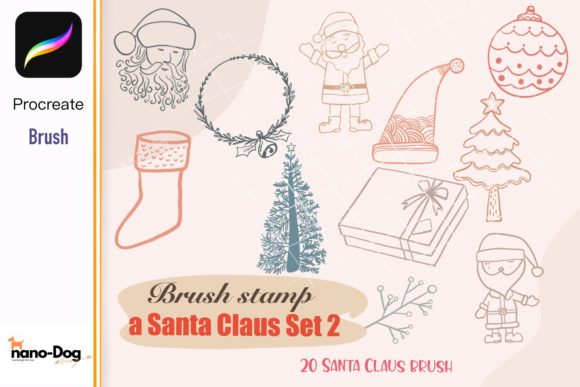
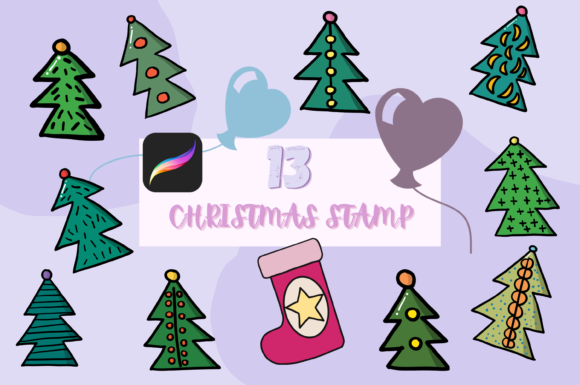
During the early stages of a project, such as drafting a holiday marketing campaign or sketching out a greeting card layout, these stamps can act as placeholders. Instead of drawing complex illustrations from scratch to test composition, you can quickly stamp various elements from the set to gauge balance and spacing. This approach allows for rapid prototyping. You can experiment with different arrangements of the 13 unique designs—ranging from traditional ornaments to festive foliage—without committing significant time to detailed rendering.
This method is particularly useful for entrepreneurs and marketers who need to visualize multiple concepts for client approval. By using the 13 Christmas Brush Stamp Set 5 to create quick mockups, you can present clear visual directions early in the process, reducing the likelihood of major revisions later on.
Execution and Layer Management
When moving into the execution phase, understanding layer management is key to maximizing the potential of these brushes. Each stamp operates as an independent object that can be manipulated individually. After stamping an element, you can use Procreate’s transform tools to adjust size, rotation, and position. This flexibility ensures that no two designs look identical, even when using the same asset library.
One of the most powerful features of this set is the ability to modify color, opacity, and blending modes. For instance, you might use a stamp at low opacity to create a subtle background texture, then overlay a solid-colored version of the same stamp to create depth. By experimenting with blending modes like Multiply, Overlay, or Screen, you can integrate the hand-drawn doodle style seamlessly with photographs, typography, or other digital illustrations. This level of control allows for a cohesive look that feels custom-made rather than assembled from stock elements.
Enhancing Efficiency Through Customization
To truly leverage the 13 Christmas Brush Stamp Set 5, consider how it interacts with other tools and methods in your toolkit. The hand-drawn, doodle aesthetic of these stamps pairs well with organic typography and textured backgrounds. However, consistency is crucial for professional outcomes.
Color Palette Coordination: Before beginning your design, define a limited color palette. Apply these colors consistently across all stamped elements. Procreate’s ColorDrop feature makes it easy to recolor stamps instantly. By adhering to a strict palette, you ensure that the diverse elements within the 13 Christmas Brush Stamp Set 5 feel unified and purposeful.
Opacity and Depth: Varying opacity is a simple yet effective technique to create visual hierarchy. Use higher opacity for primary focal points and lower opacity for secondary decorative elements. This guides the viewer’s eye through the composition and prevents the design from feeling flat or chaotic.
Mix and Match Strategies: Do not hesitate to combine elements from the 13 Christmas Brush Stamp Set 5 with other assets, such as the 13 Christmas Brush Stamp Set 3. Using multiple complementary sets can expand your visual vocabulary while maintaining a consistent artistic style. Layering different stamps can create complex compositions that appear intricate and bespoke, despite being assembled from pre-made components.
Quality Control and Final Output
As with any design project, quality control is the final safeguard before delivery or publication. When using digital stamps, it is easy to overlook resolution issues or alignment errors. Always zoom in to 100% or higher to inspect the edges of your stamped elements. Ensure that there are no pixelated artifacts, especially if you have scaled up smaller stamps significantly.
Check for visual balance. Step back from your screen or view your design at a reduced size to assess the overall composition. Are the stamped elements distracting from the main message? Is there enough negative space? The convenience of the 13 Christmas Brush Stamp Set 5 should not lead to over-decoration. Restraint is often the hallmark of sophisticated design.
Finally, consider the output format. If you are designing for print, ensure your canvas is set to CMYK color mode and 300 DPI. For digital use, RGB and 72 DPI are standard. Procreate handles these settings efficiently, but verifying them before export prevents costly rework.
Long-Term Asset Utilization
Investing in high-quality digital assets like the 13 Christmas Brush Stamp Set 5 offers long-term benefits beyond a single project. By building a library of reliable, versatile tools, you reduce the time spent sourcing new assets for each seasonal campaign. Over time, you will develop a signature style that incorporates these elements naturally, enhancing brand recognition for your business or personal portfolio.
Furthermore, mastering the integration of such tools improves your overall proficiency with Procreate. The skills learned in manipulating opacity, blending modes, and layer structures transfer to other aspects of digital art, making you a more adaptable and efficient creator. Whether you are a freelancer managing multiple clients or a hobbyist looking to elevate your personal projects, the strategic use of specialized brush sets is a hallmark of professional workflow management.
In conclusion, the 13 Christmas Brush Stamp Set 5 is more than a collection of images; it is a productivity tool designed to streamline the creative process. By preparing your workspace, integrating the stamps strategically into your workflow, and maintaining rigorous quality control, you can produce stunning, professional-grade holiday designs with greater speed and consistency. Embrace the flexibility of digital tools, and let these hand-drawn elements enhance your creative expression without compromising efficiency.