Mastering Winter Procreate Brush Stamps Color Ipad for Professional Digital Art
Digital illustration has evolved rapidly, yet many creators still struggle with the tedious process of drawing repetitive elements from scratch. This is where specialized tools like Winter Procreate Brush Stamps Color Ipad become indispensable. These resources are not merely shortcuts; they are foundational assets that allow artists to focus on composition and storytelling rather than getting bogged down in rendering every stitch of a sweater or every fold of a scarf. However, the ease of access to instant downloads often leads to misuse. Many users download these packs without understanding how to integrate them seamlessly into their workflow, resulting in artwork that looks disjointed or amateurish.
To truly leverage the potential of Winter Procreate Hand drawn Brush Stamps with color palette, one must approach them with a strategic mindset. It is not enough to simply stamp an image onto a canvas. The value lies in customization, layer management, and understanding the nuances of digital texture. Whether you are a seasoned professional creating marketing materials for a holiday campaign or a hobbyist designing personal greeting cards, avoiding common pitfalls will significantly elevate the quality of your final output.
The Misconception of "Plug-and-Play" Simplicity
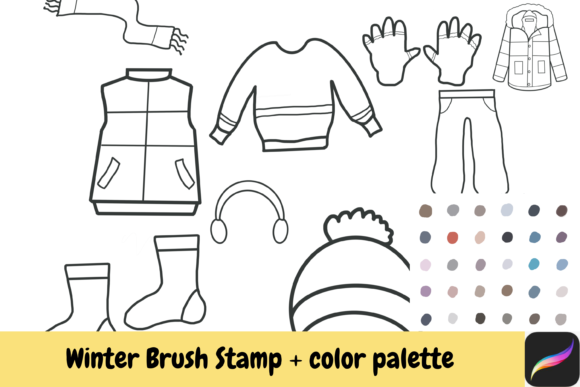
A prevalent misunderstanding among beginners is the belief that brush stamps require no artistic input. Users often assume that because the items—such as a Coat, Trouser, or Socks—are pre-drawn, they can be placed anywhere without consideration for lighting, perspective, or style consistency. This approach frequently results in flat, unconvincing compositions. When you rely solely on the default appearance of a stamp, your artwork lacks depth. The shadow under a Shoe might not match the light source of your background, or the texture of a Vest might clash with the smoother lines of a character’s face.
To avoid this, treat every stamp as a raw material rather than a finished product. Before placing a Tuque or Gloves on your canvas, analyze the direction of your light source. Use the transform tool in Procreate to adjust the angle and scale of the stamp so it aligns with the perspective of your scene. Furthermore, utilize layer blending modes. Changing a stamp layer to "Multiply" can help it integrate better with colored backgrounds, while "Overlay" can add texture without obscuring underlying details. This extra step transforms a generic clip-art look into a cohesive piece of digital art.
Overlooking the Power of the Included Color Palette
One of the most significant features of high-quality brush sets is the accompanying color palette. Yet, a surprising number of users ignore this resource, opting instead to recolor elements manually using the color picker or random hues. This is a critical error. The included palette in Winter Procreate Brush Stamps Color Ipad is curated to ensure harmonic color relationships. These colors are selected to evoke specific winter moods—cozy warmth, crisp cold, or festive cheer. Ignoring them means losing the intended atmospheric impact of the design.
When you download the package, take time to import the provided .swatches file into Procreate. Experiment with these predefined colors on your Scarf or Earmuffs. You will notice that the tones complement each other naturally, reducing the cognitive load of color theory decisions. If you need to deviate from the palette, use it as a baseline. Adjust the saturation or brightness of a palette color rather than choosing a completely unrelated hue. This maintains visual harmony while allowing for creative freedom. For entrepreneurs and marketers, this consistency is vital for brand recognition and professional presentation.
Neglecting File Management and Technical Requirements
Technical oversights can derail a creative session before it even begins. A common frustration arises when users attempt to install the brushes directly from a zipped folder without extracting the contents first. Since the product requires an instant download and comes in a compressed format, failing to unzip the file will result in missing assets or corrupted installations. This simple step is often overlooked in the excitement of starting a new project.
Additionally, ensure that you are using the correct device. These brushes are designed specifically for Procreate on iPad. Trying to force compatibility with desktop software or other mobile apps can lead to distorted brush tips and loss of pressure sensitivity data. Always verify your Procreate version is up to date to support the latest brush engine features. For small business owners who rely on efficiency, taking two minutes to properly organize your downloaded files into a dedicated folder on your iPad can save hours of troubleshooting later.
Limited Imagination in Application
Another subtle mistake is limiting the use of these stamps to their obvious contexts. While a Sweater is naturally suited for a character portrait, creative thinkers can repurpose these elements for abstract backgrounds, pattern designs, or educational materials. For educators, these stamps can be used to create engaging winter-themed worksheets or vocabulary cards. Bloggers might use isolated images of Shoes or Gloves as decorative dividers between text sections.
Do not restrict yourself to literal representations. Combine a Vest stamp with floral elements for a whimsical collage, or use the texture of a Coat as a mask for typography. The key is to view these assets as versatile building blocks. By experimenting with opacity, rotation, and layering, you can create unique visuals that do not look like standard stock imagery. This level of customization is what distinguishes professional work from generic templates.
Understanding Licensing and Commercial Use
For freelancers and entrepreneurs, understanding the licensing terms is non-negotiable. The product allows for small commercial use, but this term can be ambiguous. Typically, this means you can use the stamps in end-products you sell, such as printed invitations, social media graphics, or digital planners. However, it usually prohibits reselling the brush files themselves or using them in large-scale mass production without an extended license. Always read the specific terms included in your download.
Failing to adhere to licensing agreements can lead to legal complications and damage to your professional reputation. If you are unsure whether your intended use falls under "small commercial," contact the creator for clarification. It is better to seek permission upfront than to face repercussions after launching a product. This diligence protects your business and respects the intellectual property of the artist who created these tools.
Final Thoughts on Elevating Your Winter Designs
Incorporating Winter Procreate Brush Stamps Color Ipad into your workflow offers a blend of convenience and creative potential. By avoiding the traps of lazy placement, ignoring color palettes, and neglecting technical setup, you can produce artwork that is both efficient and high-quality. Remember that these tools are extensions of your imagination, not replacements for it. Whether you are decorating a digital journal, designing a holiday card, or creating content for your small business, the thoughtful application of these hand-drawn elements will enhance your visual storytelling. Embrace the learning curve, experiment with the provided resources, and let your creativity flourish this winter season.