Texture Brush: Elevating Hand-Drawn Patterns for Professional Design
In the rapidly evolving world of digital design, authenticity is becoming a rare and valuable commodity. As algorithms generate endless streams of polished, sterile imagery, creators are increasingly turning back to organic elements to inject soul into their work. This is where a high-quality Texture Brush becomes an indispensable tool in your creative arsenal. Whether you are designing custom apparel, crafting unique key rings, or developing eye-catching posters, the right textural elements can transform a flat concept into a tactile experience. However, simply downloading a brush pack is not enough. Many designers overlook the technical nuances that separate amateur overlays from professional-grade assets, leading to wasted time and subpar results.
Understanding the Value of Hand-Drawn Patterns
A Texture Brush is more than just a digital stamp; it is a bridge between traditional artistry and modern efficiency. When you utilize hand-drawn patterns, you are leveraging the imperfections and irregularities that make human-made art appealing. These textures add depth, grit, and character to otherwise clean vector lines or solid color blocks. For entrepreneurs and small business owners, this distinction is crucial. A t-shirt design that looks like it was slapped on with a generic clipart library fails to resonate with customers seeking uniqueness. In contrast, a design incorporating seamless, hand-crafted textures suggests care, effort, and artistic integrity.
The versatility of these assets cannot be overstated. They are perfect for decorating costumes, creating bespoke stationery, or adding a vintage feel to marketing materials. Yet, the difference between a design that sells and one that sits idle often comes down to how well the designer understands the underlying file formats and resolution requirements. Misunderstanding these basics is the first common pitfall many beginners encounter.
Common Mistakes in Selecting and Using Textures
One of the most frequent errors designers make is ignoring resolution standards. It is tempting to use low-resolution images for quick mockups, but this habit often carries over into final production files. When you print a texture at 72 DPI (dots per inch) on a physical product like a poster or a costume piece, the result is pixelated and unprofessional. Always ensure that your Texture Brush assets are provided at 300 DPI. This density ensures that when the image is printed, the edges remain crisp, and the details of the hand-drawn pattern are preserved without blurring.
Another significant oversight is neglecting background transparency. Many novice users download JPEG files exclusively, not realizing that JPEGs do not support transparent backgrounds. This forces the designer to spend hours manually removing white or black boxes around the texture using masking tools. This not only slows down workflow but often results in jagged, unnatural edges. The superior approach is to prioritize PNG files with transparent backgrounds. These allow you to layer the texture directly over your base design, letting the underlying colors show through the textured areas seamlessly.
The Importance of File Formats and Organization
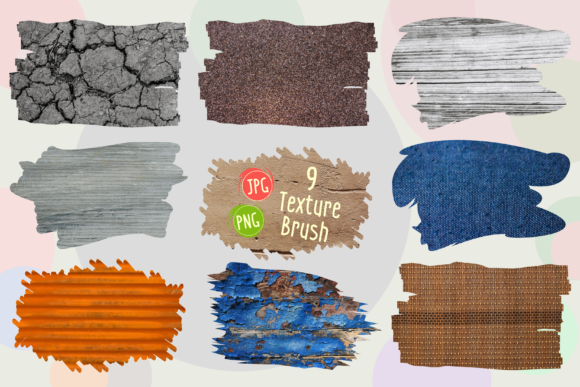
When evaluating a digital asset pack, such as the one offered by KiangStockDigiArt, pay close attention to the file structure. A well-organized package saves you from administrative headaches later. For instance, receiving a single ZIP folder containing both JPEG and PNG variants is ideal. The JPEG files are excellent for non-destructive editing in software that handles layers differently, or for use in presentations where transparency is not required. The PNG files, however, are your workhorses for actual design composition.
Consider the scenario of creating a collage of quotes for a handcraft t-shirt. If you are using a Texture Brush pattern to give the text a worn, vintage look, you need to blend it naturally with the fabric color. Using a PNG with a transparent background allows you to change the blending mode—such as "Multiply" or "Overlay"—in your design software. This integrates the texture with the shirt’s color rather than sitting on top of it like a sticker. If you had used a JPEG with a white background, this effect would be impossible without extensive photo editing, drastically reducing your efficiency.
Practical Advice for Better Design Outcomes
To avoid these pitfalls, adopt a checklist approach before you begin any project involving digital textures. First, verify the resolution. Ensure every file in your pack is 300 DPI. Second, check for transparency. Open a PNG file in your viewer; if you see a checkerboard pattern behind the design element, it is transparent and ready for layering. Third, consider the scale. Hand-drawn patterns often need to be resized to fit specific items like key rings or large posters. High-resolution source files allow you to scale up without losing quality, whereas low-res files will degrade immediately.
Furthermore, do not limit yourself to using the textures as-is. The true power of a Texture Brush lies in its adaptability. Mix and match different patterns to create a unique collage. For example, combine a rough charcoal texture with a smoother ink splatter to create depth. Use the textures to mask other elements, revealing parts of a photograph through the shape of the brush stroke. This level of customization is what separates generic designs from memorable brands.
Maximizing Versatility Across Projects
The applications for these assets extend far beyond simple decoration. For educators and bloggers, these textures can be used to create engaging visual aids that stand out in a sea of stock photography. For marketers, they add a human touch to digital ads, increasing click-through rates by breaking the pattern blindness users have developed toward polished corporate graphics. Freelancers can offer higher-value services by delivering designs that feel bespoke and artisanal, justifying higher rates.
When working on costumes or physical crafts, remember that the texture should complement the material. A rough, grainy Texture Brush might look fantastic on canvas or denim but could clash with silk or satin. Always preview your design on a mockup that resembles the final material. This step helps you adjust the opacity or contrast of the texture to ensure it enhances rather than overwhelms the base material.
Making the Right Choice for Your Workflow
Ultimately, the goal is to streamline your creative process while maximizing output quality. By choosing a comprehensive pack that includes both JPEG and PNG files at 300 DPI, you equip yourself for any scenario. You eliminate the need for third-party conversion tools and reduce the risk of printing errors. The peace of mind that comes from knowing your assets are production-ready allows you to focus on creativity rather than troubleshooting technical issues.
As you explore the possibilities of hand-drawn patterns, remember that consistency is key. Stick to a curated set of textures that align with your brand’s aesthetic. This creates a cohesive visual language across all your projects, from t-shirts to posters. The investment in high-quality, versatile assets pays dividends in time saved and customer satisfaction gained.
Thank you for visiting my store. Designed and created by KiangStockDigiArt, this collection is crafted with the professional creator in mind, ensuring that every stroke and pattern serves a purpose in your next masterpiece.