Unlock Whimsical Designs with the Build a Gnome Stamp Brush for Procreate
Digital illustration has evolved from simple sketching to complex, layered compositions that mimic traditional media while offering unparalleled flexibility. For artists, designers, and hobbyists who spend their days on an iPad, finding tools that streamline the creative process without sacrificing uniqueness is essential. This is where specialized assets like the Build a Gnome Stamp Brush for Procreate come into play. It is not just a brush; it is a modular system designed to help you create endless variations of charming gnome characters with minimal effort.
Understanding the value of this tool requires looking beyond the basic definition of a digital stamp. In the world of Procreate, efficiency often battles with originality. Standard brushes can feel repetitive, but a mix-and-match stamp set allows for rapid prototyping and customization. Whether you are designing holiday cards, creating social media content, or developing assets for print-on-demand products, having a reliable library of whimsical elements can significantly reduce production time while maintaining a handcrafted aesthetic.
Transforming Seasonal Greeting Cards and Invitations
One of the most immediate applications for this brush set is in the creation of seasonal stationery. The demand for personalized, non-generic greeting cards peaks during holidays like Christmas, Thanksgiving, and even birthdays. Traditional methods of drawing each gnome individually are time-consuming and often result in inconsistencies across a batch of cards. With the Build a Gnome Stamp Brush for Procreate, you can assemble unique characters in seconds.
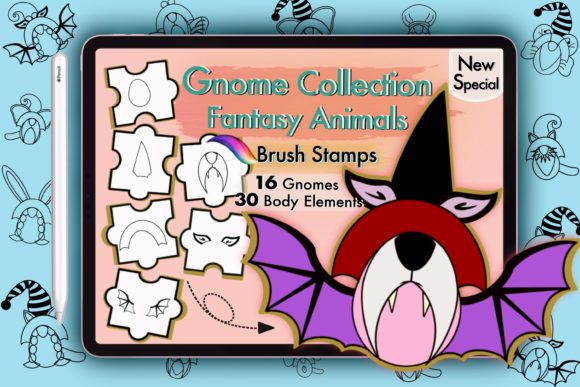
Imagine you are designing a set of twelve Christmas cards for a client. Instead of drawing twelve distinct gnomes from scratch, you utilize the thirty body parts included in the mix-and-match collection. You combine a striped hat from one preset with a bushy beard from another and a cozy sweater from a third. Because the stamps feature transparent backgrounds, layering these elements feels natural. You can adjust the opacity, change the hue, or add texture overlays to ensure no two gnomes look exactly alike. This level of customization allows small business owners and freelance designers to offer bespoke services at a scalable pace.
Furthermore, invitations for children’s parties or winter-themed events benefit greatly from this playful aesthetic. Parents and event planners often seek designs that are cheerful yet sophisticated enough to avoid looking cheap. By using high-quality digital stamps, you maintain vector-like clarity when exporting your work, ensuring that printed invitations look crisp and professional. The ability to tweak colors means you can match the gnomes to specific party themes, such as pastel tones for a spring celebration or deep reds and greens for a holiday gala.
Enhancing Social Media Content and Digital Marketing
In the fast-paced environment of social media marketing, visual consistency and speed are paramount. Content creators need to produce engaging graphics daily, and relying solely on stock photos can make a brand feel impersonal. Integrating custom illustrations using the Build a Gnome Stamp Brush for Procreate adds a distinctive voice to your digital presence.
Consider a lifestyle blogger or a small ecommerce shop specializing in home decor. During the winter months, featuring gnomes in Instagram stories, Pinterest pins, or Facebook posts can evoke feelings of warmth and nostalgia. These digital stamps allow you to create cohesive visual narratives. You might place a gnome next to a product photo, use them as decorative borders for quote graphics, or animate them slightly using Procreate’s animation assist feature for dynamic reels. The transparent backgrounds are crucial here, allowing seamless integration over various background images without awkward white boxes or messy edges.
Moreover, influencers and content creators who focus on DIY or crafting niches can use these stamps to create tutorial thumbnails or promotional banners. The whimsical nature of gnomes appeals to a broad demographic, particularly those interested in cozy, hygge-inspired lifestyles. By having a dedicated brush set, you eliminate the need to search for external clip art, which often comes with licensing restrictions or inconsistent styles. Everything you need is contained within one file, ready to be deployed whenever inspiration strikes.
Practical Considerations for Digital Asset Usage
While the creative possibilities are vast, it is important to approach digital downloads with a clear understanding of their technical requirements and limitations. The Build a Gnome Stamp Brush for Procreate is specifically designed for the Procreate app on iPad. This specificity is both a strength and a constraint. For users deeply embedded in the Apple ecosystem, this integration is seamless. However, those accustomed to working in Photoshop, Illustrator, or on Android tablets will find this tool incompatible. It is vital to verify your software compatibility before purchase, as digital files cannot be returned or exchanged once downloaded.
The nature of instant digital downloads means that the responsibility for file management falls on the user. Upon purchase, you receive a ZIP file containing the brush set, installation instructions, and a ReadMe file. Users must have a program capable of unzipping files on their iPad or computer. While this is a standard procedure for most digital artists, beginners may find this step confusing. Taking a moment to understand how to extract and import .brushset files into Procreate ensures a smooth setup process. Once installed, the brushes appear in your library, ready for immediate use.
Another consideration is the learning curve associated with "build-a-character" systems. While the stamps are pre-designed, achieving a balanced and aesthetically pleasing composition requires an eye for proportion and color theory. Beginners might initially struggle with layering order or color harmony. However, the inclusion of instruction files helps mitigate this issue. Experimenting with different combinations is part of the fun, but patience is key. Start by mimicking existing gnome designs to understand how the parts fit together, then gradually introduce your own variations.
Expanding into Print-on-Demand and Product Design
For entrepreneurs looking to monetize their artistic skills, print-on-demand (POD) platforms offer a lucrative avenue. Products like tote bags, mugs, pillows, and apparel often feature cute, character-driven designs. The Build a Gnome Stamp Brush for Procreate provides a steady stream of original content for these ventures. Since each combination of body parts creates a unique character, you can generate hundreds of distinct designs without repeating yourself.
When preparing files for POD, resolution and transparency are critical. The high-quality nature of these Procreate brushes ensures that your exports remain sharp even when scaled up for larger products. You can experiment with different textures and patterns within Procreate to give your gnomes a fabric-like or hand-painted appearance, adding value to the final product. Additionally, because you are creating the artwork yourself using licensed tools, you retain full commercial rights to the final images, allowing you to sell them freely on platforms like Etsy, Redbubble, or Amazon Merch.
It is worth noting that while the brushes themselves are digital, the end products are physical. This bridge between digital creation and tangible goods is where many artists find their niche. By leveraging tools that speed up the design phase, you can focus more on marketing and customer engagement. The versatility of the gnome theme appeals to multiple demographics, from children to adults who appreciate whimsical home decor, broadening your potential customer base.
Maximizing Creativity Within Constraints
Ultimately, the Build a Gnome Stamp Brush for Procreate is about empowering creativity through structure. It removes the barrier of starting from a blank canvas while still leaving ample room for personal expression. By providing a curated set of high-quality components, it encourages users to think critically about design choices such as color pairing, accessory selection, and overall composition.
Whether you are a seasoned illustrator looking to speed up your workflow or a beginner eager to create professional-looking digital art, this tool offers significant value. It transforms the tedious task of drawing repetitive elements into an enjoyable, modular building process. As long as you understand the technical requirements and embrace the experimental nature of mix-and-match design, this brush set can become a staple in your digital toolkit, enhancing everything from personal projects to commercial enterprises.