Evaluating the Procreate Color Palette Marshmallow for Digital Illustrators
Digital illustration relies heavily on color theory and efficient workflow management. For artists using the iPad-based application Procreate, selecting the right color combinations can often be the most time-consuming part of the creative process. Pre-made palettes offer a solution to this bottleneck, providing curated sets of hues that are designed to work harmoniously together. One such option gaining attention is the Procreate Color Palette Marshmallow. This resource is specifically tailored for creators who prefer soft, pastel, and gentle aesthetic tones in their artwork. Understanding what this palette offers, how it integrates into the Procreate ecosystem, and whether it aligns with your specific artistic needs is essential before making a purchase decision.
Understanding the Product and File Format
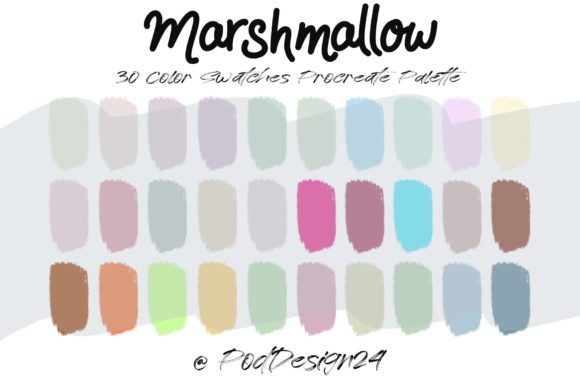
The Procreate Color Palette Marshmallow is a digital asset consisting of thirty distinct colors. These colors are not random; they are curated to evoke a "marshmallow" theme, which typically implies soft whites, pale pinks, light blues, creamy yellows, and muted lavenders. The primary value proposition here is convenience. Instead of manually adjusting hue, saturation, and brightness sliders to find complementary pastel shades, users can import a ready-made set.
Technically, the product is delivered as a ZIP file. Inside this archive, users will find a swatch file compatible with Procreate. It is crucial to note that this is not a standalone application or a plugin. It is a data file that must be imported into the Procreate app. Once downloaded, the user extracts the file and opens it within Procreate, where the thirty colors automatically populate a new palette slot in the color library. This seamless integration is a standard feature of Procreate’s file handling, but it requires the user to have the Procreate app installed on an iPad. There is no web-based viewer or desktop compatibility for these specific swatch files, as they are proprietary to the Procreate environment.
Aesthetic Appeal and Use Cases
The "Marshmallow" aesthetic is popular in several niches of digital art. It is particularly well-suited for character design, children’s book illustrations, sticker art, and social media graphics that aim for a calming or cute vibe. Pastel palettes are also frequently used in planning journals, digital scrapbooking, and UI mockups that require a soft, approachable feel.
For artists who struggle with color harmony, a pre-curated palette like this reduces cognitive load. By limiting the choice to thirty cohesive colors, the artist can focus more on composition, line work, and shading rather than worrying whether two clashing hues will disrupt the visual balance. The limited range encourages creativity through constraint, a common technique in artistic training. Furthermore, having a consistent palette allows for brand consistency if you are creating a series of illustrations or maintaining a cohesive look across a social media feed.
Practical Considerations and Tradeoffs
While the convenience of a pre-made palette is evident, there are tradeoffs to consider. The most significant limitation is flexibility. A fixed set of thirty colors may not cover every lighting scenario or mood you wish to depict. Pastel palettes, by definition, lack high-saturation vibrant colors and deep, dark shadows. If your illustration style relies on high contrast, dramatic lighting, or neon accents, the Procreate Color Palette Marshmallow may feel restrictive. You might find yourself needing to manually adjust the imported colors anyway, which negates some of the time-saving benefits.
Another consideration is the learning curve associated with file management. Users must be comfortable downloading ZIP files on their iPad, extracting them, and knowing how to import .swatchprocreate files. While Procreate makes this process relatively straightforward, it is not always intuitive for beginners. The annotation provided with the product explicitly states: Please be sure the files listed above will work with your machine and software before purchase. This is a critical warning. If you are using an older version of Procreate or a different digital art software like Clip Studio Paint or Adobe Fresco, this file will not be compatible. There are no refunds for digital downloads typically, so verifying software compatibility is a mandatory step.
Evaluating Value Against Alternatives
When deciding whether to invest in this specific palette, it is helpful to compare it against alternatives. One alternative is creating your own palette. This requires a strong understanding of color theory but results in a completely customized set of colors that fit your unique style. Another alternative is using free online palette generators. Websites like Coolors or Adobe Color allow users to generate pastel schemes and export them. However, these often require conversion steps to work in Procreate, whereas the Procreate Color Palette Marshmallow is ready to use immediately upon import.
Paid marketplaces also offer thousands of other palettes. Some are themed around nature, cyberpunk, or vintage aesthetics. The decision to choose the Marshmallow palette should depend on your current project needs. If you are working on a spring-themed collection or a baby shower invitation, this palette is a strong fit. If you are working on a horror comic or a sci-fi battle scene, it is likely unsuitable.
Decision-Making Insights for Buyers
To determine if this product aligns with your goals, ask yourself three questions. First, do you frequently use pastel or soft tones in your work? If your style is predominantly dark or highly saturated, this purchase may not yield a high return on investment. Second, are you looking to speed up your workflow? If you spend hours tweaking colors, a pre-set palette can save significant time. Third, are you comfortable with the technical requirements? Ensure you have an iPad with Procreate installed and know how to manage ZIP files.
It is also worth considering the size of the palette. Thirty colors is a moderate number. It is enough to provide variety for shading and highlighting within a pastel range but small enough to keep the interface uncluttered. Some artists prefer larger palettes with hundreds of colors, but these can be overwhelming. The curated nature of this product suggests a focus on quality and harmony over quantity.
Final Thoughts on Integration and Utility
The Procreate Color Palette Marshmallow serves as a specialized tool for a specific aesthetic. It is not a universal solution for all coloring needs, but it is a highly effective resource for its intended niche. The ease of installation via the ZIP file and direct Procreate integration makes it accessible for most intermediate users. However, beginners should take heed of the compatibility warnings and ensure their software is up to date.
Ultimately, the value of this palette lies in its ability to streamline the creative process for artists who already favor soft, gentle color schemes. It removes the guesswork from color selection, allowing for a more fluid drawing experience. For those whose artistic vision aligns with the marshmallow aesthetic, this tool offers a practical, time-saving advantage. For others, it may serve as a starting point for further customization, though manual adjustments will likely be necessary. As with any digital asset, careful evaluation of your personal style and technical setup is the best predictor of satisfaction.