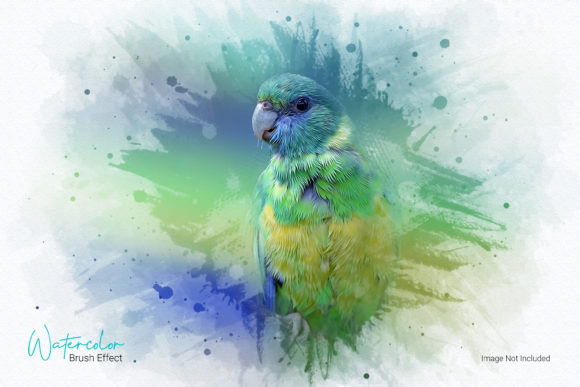
Evaluating the Watercolor Photo Effect Template for Digital Artists
In the rapidly evolving landscape of digital design, the demand for unique visual aesthetics continues to grow. Creators, marketers, and photographers often seek ways to differentiate their content without investing hours in manual illustration or complex post-processing. This is where automated tools like the Watercolor Photo Effect Template and associated Photoshop actions become valuable assets. These resources promise to transform standard photographic imagery into stylized art pieces that mimic traditional media, specifically watercolor and oil paint textures. For professionals and serious hobbyists alike, understanding the utility, limitations, and practical application of these tools is essential before integrating them into a workflow.
Understanding the Core Functionality
A Watercolor Photo Effect Template is typically a pre-configured Adobe Photoshop file (PSD) or a set of actions designed to apply specific artistic filters and layer styles to an image. The primary goal is to simulate the organic, fluid nature of watercolor painting or the thick, textured impasto of oil paints. Unlike simple filter apps found on mobile devices, these professional-grade actions utilize complex layer masks, blending modes, and texture overlays to achieve a more convincing result.
The process generally involves a "one-click" application, although optimal results often require minor manual adjustments. The action analyzes the underlying photo’s contrast and color data, applying brush strokes and paper textures that react to the image’s luminance. This allows users to convert high-resolution photographs into compelling artistic compositions suitable for print, web headers, social media content, or personal projects. The inclusion of both watercolor and oil paint variations within a single package provides versatility, allowing creators to choose between the soft, translucent look of watercolors or the bold, dramatic presence of oil paintings.
Key Characteristics and Technical Requirements
To maximize the effectiveness of any digital art action, understanding the technical specifications is crucial. The quality of the output is directly correlated with the input quality. Most professional actions, including this specific Watercolor Oil Paint Photoshop Action, are optimized for high-resolution images. It is strongly recommended to use photos with a resolution of at least 300 DPI (dots per inch). Lower resolution images may result in pixelation or a loss of detail when the texture overlays are applied, diminishing the realistic effect.
- Clean Actions and Workflow: The code behind the action should be organized, ensuring that it does not clutter the Photoshop layers panel with unnecessary groups or hidden elements. A clean workspace facilitates easier editing and troubleshooting.
- File Information and Support: A comprehensive help file is a significant indicator of quality. It guides users through installation, usage, and troubleshooting, which is particularly beneficial for those less familiar with advanced Photoshop features.
- Versatility of Effects: Beyond standard watercolor, these templates often include options for vintage, dramatic, or cartoon-like effects. This breadth allows users to adapt the style to different brand identities or artistic visions.
The requirement for a specific image size and resolution is not merely a suggestion but a technical necessity. Watercolor effects rely heavily on the subtle gradations of color and the interplay between light and shadow. High-DPI images retain these nuances, allowing the action to create smooth transitions and realistic bleed effects that mimic real paint on paper.
Practical Application and Real-World Performance
In a professional setting, time efficiency is paramount. The primary advantage of using a Watercolor Photo Effect Template is the significant reduction in production time. Manually painting a watercolor effect from scratch can take hours, requiring expertise in digital brushing, mask creation, and texture manipulation. An automated action reduces this process to minutes, allowing designers to iterate quickly and present multiple concepts to clients.
However, real-world performance varies depending on the source image. Photos with strong contrasts, clear subjects, and distinct lighting tend to yield the best results. Portraits, landscapes, and architectural shots often translate well because the action can clearly define edges and apply textures accordingly. Conversely, images with low contrast or excessive noise may produce muddy or undefined results. In such cases, pre-processing the photo—adjusting levels, clarity, or sharpness—can significantly enhance the final output.
For marketers and small business owners, these effects offer a cost-effective way to create eye-catching visuals. Whether used for product packaging, blog headers, or social media posts, the artistic flair adds a layer of sophistication and uniqueness that stock photography alone cannot provide. The ability to toggle between different styles, such as switching from a soft watercolor to a bold oil paint effect, allows for A/B testing of visual strategies to see what resonates best with the target audience.
Strengths and Limitations
When evaluating the Watercolor Oil Paint Photoshop Action, it is important to maintain a balanced perspective regarding its strengths and limitations.
Strengths
- Consistency: Once calibrated, the action provides a consistent look across multiple images, which is vital for branding and cohesive campaign designs.
- Non-Destructive Editing: Most high-quality actions utilize adjustment layers and smart objects, meaning the original photo remains untouched. Users can tweak opacity, blending modes, or colors after the action has been applied.
- Accessibility: The "one-click" nature lowers the barrier to entry for non-artists who wish to achieve professional-looking results without years of training.
Limitations
Despite their convenience, these templates are not a substitute for genuine artistic skill in every scenario. The automated nature means there is limited control over exactly where each brush stroke lands. For highly specific artistic directions, manual refinement may still be required. Additionally, overuse of such effects can lead to a generic aesthetic if not customized further. Designers must ensure that the chosen style aligns with the overall brand identity and does not appear out of place or gimmicky.
Another consideration is software compatibility. These actions are designed for Adobe Photoshop, which requires a subscription. Users relying on alternative software like GIMP or Affinity Photo will not be able to utilize these specific PSD-based actions, limiting their accessibility to the Adobe ecosystem.
Who Benefits Most from This Tool?
The Watercolor Photo Effect Template is particularly beneficial for several distinct groups:
- Freelance Designers: Those who need to deliver diverse stylistic options to clients quickly will find this tool invaluable for expanding their service offerings without increasing workload proportionally.
- Photographers: Portrait and wedding photographers can offer unique artistic prints as upsells, providing clients with tangible, gallery-worthy products that stand out from standard digital files.
- Content Creators and Bloggers: Individuals managing their own brands can create distinctive featured images that capture attention in crowded social feeds or search results.
- Educators and Publishers: Those creating educational materials or book covers may use these effects to create engaging, illustrative visuals that soften the rigidity of standard photography.
Final Recommendations for Best Results
To get the most out of this resource, start by selecting high-quality source images with good lighting and composition. Run the primary action first to assess the baseline effect. From there, utilize the included layers to fine-tune the intensity of the paint texture, the brightness, and the contrast. Do not hesitate to experiment with the different variations provided, such as the vintage or dramatic modes, to see which best suits the mood of the piece.
Remember that while the tool automates the heavy lifting, the human eye is still the best judge of quality. Review the output at 100% zoom to check for artifacts or unnatural edges. If necessary, use standard Photoshop tools to clean up specific areas or enhance details that the action may have obscured. By combining the efficiency of the Watercolor Photo Effect Template with thoughtful manual oversight, users can achieve professional, artistic results that elevate their visual content effectively.