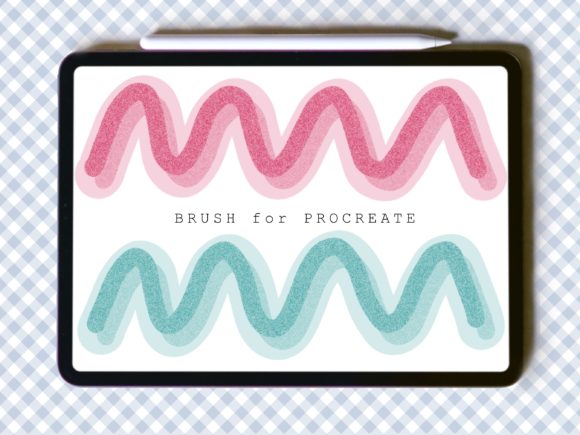
Mastering Digital Sparkle: A Deep Dive into the Shadow and Glitter Brush Lily Brush for Procreate
In the rapidly evolving landscape of digital illustration, the distinction between a good piece of art and a breathtaking one often lies in the texture. While flat colors and clean lines form the backbone of any design, it is the nuanced details—such as shimmer, light reflection, and atmospheric depth—that breathe life into a composition. For artists working within the iPad ecosystem, finding tools that accurately replicate these physical phenomena can be a challenge. This is where specialized tools like the Shadow and Glitter Brush Lily Brush come into play, offering a unique solution for creators seeking to add luminous depth to their work.
Digital painting has moved far beyond simple mimicry of traditional media. Today’s creators are looking for hybrid effects that are difficult or impossible to achieve with physical paints. The concept of a brush that behaves differently depending on the background value—acting as a subtle shadow tool on light surfaces and a vibrant glitter effect on dark ones—represents a significant leap in workflow efficiency. By understanding how such tools function, artists can elevate their digital portfolios, create more engaging social media content, and streamline their creative processes.
The Mechanics of Dynamic Lighting in Digital Art
To appreciate the utility of the Lily Brush, one must first understand the technical demands of rendering light and shadow. In traditional media, adding glitter requires specific materials: glue, loose pigment, or metallic paints. These materials interact with ambient light physically. In a digital environment, simulating this interaction requires complex layering, blending modes, and often, multiple brush strokes to achieve a natural look.
The Shadow and Glitter Brush Lily Brush simplifies this by embedding these behaviors directly into the brush engine. When applied over a dark background, the brush particles reflect light, mimicking the scattering effect of real glitter. Conversely, when used on lighter areas, the same brush strokes can provide depth and shadow, allowing for a seamless transition between highlighting and shading without switching tools. This duality is not just a novelty; it is a practical application of how light interacts with matter, translated into code for the Procreate environment.
This dynamic behavior allows for a more intuitive painting experience. Instead of constantly adjusting opacity sliders or switching between a hard round brush for shadows and a textured brush for sparkles, the artist can maintain their flow. The brush responds to the context of the canvas, making it an intelligent assistant in the creative process. For professionals working under tight deadlines, this reduction in friction can significantly impact productivity.
Compatibility and Technical Specifications
One of the most critical aspects of adopting any new digital tool is understanding its ecosystem limitations. The Shadow and Glitter Brush Lily Brush is engineered specifically for Procreate, the leading raster graphics editor for iPad. It is essential to note that this brush file will not function with other software such as Adobe Photoshop, Clip Studio Paint, or Affinity Designer. This specificity ensures that the brush leverages Procreate’s unique rendering engine to deliver the intended visual effects.
Furthermore, the hardware interface plays a crucial role in the performance of this tool. The brush has been tested exclusively with the Apple Pencil. The pressure sensitivity and tilt recognition capabilities of the Apple Pencil are integral to how the brush deposits pigment and glitter particles on the canvas. Using a capacitive stylus or a finger may result in inconsistent output, lacking the nuanced control required to manipulate the opacity and density of the glitter effect. For serious creators, investing in the correct hardware is as important as selecting the right software.
The distribution format is straightforward yet efficient. Upon purchase, users receive a ZIP file containing a single .brush file named Lily.brush. The installation process is designed to be user-friendly: after downloading and unzipping the file, the user simply selects "Open" and chooses Procreate from the share sheet. The app automatically imports the brush into the current brush set, ready for immediate use. This simplicity lowers the barrier to entry, allowing artists to focus on creation rather than troubleshooting file formats.
Practical Applications for Diverse Creators
The versatility of the Lily Brush makes it suitable for a wide range of artistic disciplines. Its ability to adapt to background colors opens up numerous possibilities for different types of projects.
- Character Design and Illustration: Artists can use the brush to add magical elements to fantasy characters, such as sparkling dust on fairy wings or metallic accents on armor. The shadow capability allows for quick definition of muscle structure or fabric folds without leaving the current tool selection.
- Digital Fashion Design: Rendering fabrics like sequins, silk, or metallic threads is notoriously difficult in digital art. This brush can simulate the reflective quality of high-end textiles, providing designers with a realistic preview of how garments might catch the light.
- Social Media Content Creation: In an era where visual engagement is paramount, adding subtle glitter effects to typography or backgrounds can make posts stand out. The brush allows for quick embellishments that enhance aesthetic appeal without overwhelming the core message.
- Educational Materials: Educators creating digital worksheets or interactive lessons can use the brush to highlight key information or add engaging visual cues that capture students' attention.
For hobbyists and beginners, the brush serves as an excellent learning tool. By observing how the glitter effect emerges on dark backgrounds, users can gain a better understanding of value contrast and lighting principles. It provides immediate visual feedback, reinforcing the connection between artistic intent and digital execution.
Maximizing Potential Through Opacity and Color Variation
While the brush comes with predefined settings, its true power is unlocked when users experiment with color and opacity. The Shadow and Glitter Brush Lily Brush is designed to be flexible. Users can adjust the opacity to create subtle, ethereal glimmers or crank it up for bold, statement-making sparkle.
Color selection also plays a pivotal role. On a dark blue background, a silver or white setting will produce a cool, moonlit glitter effect. Switching to a gold or yellow hue on the same background can evoke warmth and festivity. On lighter backgrounds, using a darker shade of the base color can create soft, natural-looking shadows that integrate seamlessly with the underlying artwork. This level of customization ensures that the brush remains relevant across various artistic styles, from minimalist line art to complex, painterly compositions.
It is recommended that artists create a few test swatches on separate layers before applying the brush to their final piece. This practice allows for fine-tuning the size and opacity settings to match the resolution and scale of the specific project. Since digital art is non-destructive, experimenting with these variables carries no risk, encouraging exploration and discovery.
Integrating the Tool into Your Workflow
Adopting a new brush is not just about installation; it is about integration. To get the most out of the Lily Brush, consider incorporating it into your standard layering strategy. Many professional illustrators prefer to keep texture and effect layers separate from the base color layers. This approach allows for greater control during the editing phase. You can adjust the blending mode of the glitter layer—using options like "Screen" or "Add" for enhanced brightness—or mask out areas where the effect is too strong.
Additionally, combining the Shadow and Glitter Brush Lily Brush with other Procreate features, such as the Liquify tool or Gaussian Blur, can create even more sophisticated effects. For instance, applying a slight blur to a glitter stroke can simulate a bokeh effect, adding depth of field to your composition. These advanced techniques demonstrate how a single specialized tool can serve as a catalyst for broader creative experimentation.
Ultimately, the value of this brush lies in its ability to bridge the gap between technical precision and artistic expression. By handling the complex calculations of light reflection and shadow deposition, it frees the artist to focus on composition, storytelling, and emotion. Whether you are a seasoned professional looking to refine your toolkit or a newcomer eager to explore the possibilities of digital media, the Shadow and Glitter Brush Lily Brush offers a reliable, high-quality means to add that essential touch of magic to your work.