Mastering Digital Ink: A Practical Guide to the Ink Art Brush Collection and Its File Formats
The resurgence of traditional ink aesthetics in digital design has created a unique demand for tools that bridge the gap between organic hand-drawn textures and precise vector scalability. For designers, illustrators, and creative professionals aged twenty to fifty, selecting the right asset library is less about finding the "best" brush and more about identifying the most versatile workflow solution. The Ink Art Brush Collection emerges as a comprehensive resource in this space, offering a multi-format approach that caters to both raster-based painting and vector-based illustration.
Understanding whether this collection fits your specific project requirements requires a close look at its components, compatibility, and how it compares to single-format alternatives. This analysis explores the practical applications of the included file types—AI, EPS, SVG, JPG, PNG, and ABR—to help you make an informed decision about integrating these assets into your creative toolkit.
Deconstructing the Multi-Format Advantage
Most digital brush packs limit themselves to a single ecosystem, typically providing only Photoshop brushes (ABR) or vector paths (SVG). The Ink Art Brush Collection distinguishes itself by providing a hybrid suite. This diversity is not merely a marketing feature; it addresses the fragmented nature of modern design workflows where a single project often moves between multiple software environments.
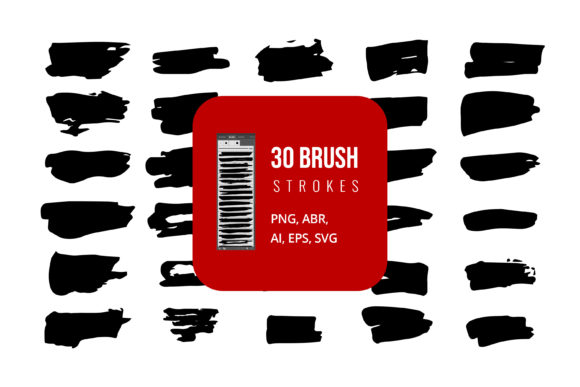
The inclusion of ABR (Adobe Brush) files targets users who prioritize texture, pressure sensitivity, and natural media simulation within Adobe Photoshop. These brushes are ideal for concept art, digital painting, and adding organic imperfections to clean layouts. Conversely, the AI, EPS, and SVG files cater to graphic designers working in Adobe Illustrator, CorelDRAW, or web-focused design tools. These vector formats ensure that ink splatters, strokes, and calligraphic elements remain crisp at any scale, from business cards to billboard advertisements.
Furthermore, the provision of JPG and PNG files serves a crucial role for users who may not have access to advanced design software or who need quick drag-and-drop assets for presentations. These raster images are immediately usable in Microsoft Word, PowerPoint, and various content management systems, lowering the barrier to entry for non-designers who still require high-quality visual elements.
Vector vs. Raster: Choosing the Right Format for Your Workflow
When evaluating the Ink Art Brush Collection, it is essential to understand the tradeoffs between the vector and raster components. Your choice should depend on the final output medium and the level of editability required.
The Case for Vector Files (AI, EPS, SVG)
Vector files are mathematically defined paths. In the context of ink art, this means that every splatter and stroke can be resized without losing quality. This is particularly beneficial for branding and logo design, where consistency across different sizes is mandatory. The AI and EPS formats are industry standards for print production, ensuring that colors and shapes remain accurate when sent to professional printers.
- Scalability: Infinite resolution makes these files future-proof for large-format printing.
- Editability: Individual anchor points can be manipulated in Adobe Illustrator, allowing you to customize the shape of an ink blot to fit a specific composition.
- File Size: Generally smaller than high-resolution raster images, making them easier to store and share.
However, vectors can sometimes lack the subtle textural nuances of real ink. While the Ink Art Brush Collection attempts to mimic this through complex pathing, purists may find the edges too clean compared to a scanned photograph of actual ink on paper.
The Case for Raster Brushes and Images (ABR, JPG, PNG)
Raster formats rely on pixels. The ABR brushes in this collection are designed to simulate the fluid dynamics of ink, reacting to tablet pressure and tilt. This creates a more authentic, organic feel that vectors struggle to replicate. JPG and PNG files provide static versions of these textures, ready for immediate use.
- Texture and Depth: Raster formats capture the grain of paper and the bleeding of ink, offering a higher degree of realism.
- Ease of Use: PNGs with transparent backgrounds can be dropped directly into almost any design software, including Canva, PowerPoint, and Word.
- Limitations: Scaling up a JPG or PNG beyond its original dimensions results in pixelation. Additionally, editing the shape of a raster ink splatter is difficult without advanced masking techniques.
Software Compatibility and Integration
One of the primary strengths of the Ink Art Brush Collection is its broad software compatibility. While many niche brush sets are locked into the Adobe ecosystem, this collection acknowledges the diverse toolsets used by professionals today.
For Adobe users, the integration is seamless. The ABR files install directly into Photoshop, while the AI and EPS files open natively in Illustrator. However, the value extends beyond Adobe products. The SVG format is universally supported by modern web browsers and design tools like Figma and Sketch, making these ink elements suitable for UI/UX design and web development.
For corporate users or educators who rely on Microsoft Office, the JPG and PNG files are invaluable. Being able to insert a high-quality ink border or decorative element into a PowerPoint presentation or Word document without needing to convert files saves significant time. This cross-platform utility makes the collection a practical choice for teams where design responsibilities are shared among individuals with varying levels of technical expertise.
Comparing Against Single-Format Alternatives
When researching alternatives, you will often encounter specialized packs that offer either ultra-realistic raster brushes or highly stylized vector icons. How does the Ink Art Brush Collection compare?
Specialized Raster Packs: These often provide superior texture fidelity. If your sole focus is hyper-realistic digital painting, a dedicated ABR-only pack might offer more variation in brush dynamics. However, you lose the ability to scale elements for print without quality loss.
Vector Icon Libraries: These offer clean, geometric precision but often lack the organic chaos associated with ink art. They are better suited for technical diagrams than artistic compositions.
The Ink Art Brush Collection occupies a middle ground. It sacrifices some extreme specialization for versatility. It is not necessarily the most realistic brush set available, nor is it the most geometrically precise vector library. Instead, it offers a balanced compromise that allows a designer to start a project in Photoshop with textured brushes and finish it in Illustrator with scalable vectors, all while maintaining a consistent visual style.
Decision Factors: Is This Collection Right for You?
To determine if this collection aligns with your needs, consider the following scenarios:
Choose the Ink Art Brush Collection if:
- You work across multiple disciplines, such as web design and print branding.
- You need assets that are editable in both vector and raster environments.
- You collaborate with team members who use different software, including Microsoft Office.
- You value workflow efficiency over having the absolute highest number of brush variations.
Consider alternative options if:
- You are a pure digital painter who never uses vector software.
- You require extremely specific, custom-made brush dynamics that mimic rare traditional tools.
- Your work is exclusively for high-end print media where only CMYK-separated vector files are acceptable (though EPS handles this, check color profiles).
Practical Application Examples
Imagine you are designing a packaging label for an artisanal coffee brand. You might use the ABR brushes in Photoshop to create a textured background that mimics stained paper. Next, you could import an SVG ink splash from the collection to frame the logo, ensuring it scales perfectly to the curved surface of the bag. Finally, you might use a PNG version of a brush stroke in your client presentation deck to quickly illustrate the concept without opening heavy design files.
This fluid movement between formats is where the true value of the Ink Art Brush Collection lies. It reduces the friction between ideation and execution, allowing creators to focus on the artistic vision rather than technical file conversion hurdles.
In conclusion, while no single resource can meet every possible design need, the Ink Art Brush Collection offers a robust, flexible foundation for modern creatives. By providing a comprehensive suite of AI, EPS, SVG, JPG, PNG, and ABR files, it empowers users to adapt their workflow to the task at hand, whether that involves detailed digital painting, scalable vector graphics, or quick document enhancement. Evaluating your specific software ecosystem and project requirements will help you determine if this versatile toolkit is the right addition to your design resources.