Zodiac Girls Illustrations Leo: A Practical Guide to Quality and Usage
The appeal of astrological art lies in its ability to blend personal identity with aesthetic expression. Zodiac Girls Illustrations Leo represents a specific niche within this market, combining the fiery, confident energy of the Lion sign with modern character design. For creators, entrepreneurs, and gift-givers, these illustrations offer a versatile asset. However, the difference between a professional-looking final product and a disappointing result often comes down to how you evaluate and apply the source file. Many buyers rush into purchases without understanding the technical nuances of digital illustration files, leading to issues with print quality, scalability, and overall presentation.
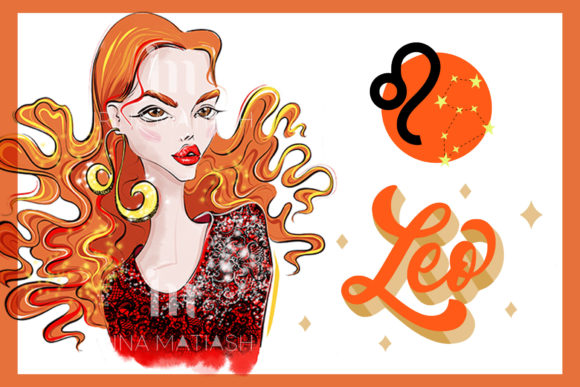
Understanding what makes a high-quality illustration is the first step toward avoiding common pitfalls. When you look at an illustration featuring a girl wearing zodiac sign jewelry labeled LEO, you are not just buying a picture; you are acquiring a tool for communication or decoration. Whether you intend to print it on a T-shirt, mug, notebook, or phone case, the underlying file quality dictates the outcome. This guide explores the frequent mistakes made when selecting and using these assets and provides corrective strategies to ensure your projects meet professional standards.
Misunderstanding Resolution and Print Quality
One of the most critical errors beginners make is ignoring resolution requirements. Digital screens and physical printers operate differently. An image that looks crisp on a smartphone may appear pixelated or blurry when printed on a large surface like a poster or even a standard T-shirt. The specification of 2800x2800px is significant here. This square format provides a high pixel count, which is essential for maintaining clarity.
Many consumers assume that any JPEG file is suitable for all printing methods. This is a misconception. While JPEGs are universal, they are raster images, meaning they are made of pixels. If you stretch a low-resolution image, the pixels become visible, degrading the quality. With a 2800x2800px file, you have enough data to print at a reasonable size with high DPI (dots per inch). For example, at 300 DPI—the standard for high-quality printing—this image can be printed at approximately 9.3 inches by 9.3 inches. If you attempt to print it larger without upscaling software, the quality will suffer.
Practical Advice: Before purchasing or downloading, always check the dimensions. If you plan to print on a large item like a blanket or wall art, verify if the 2800x2800px resolution meets your size needs. For smaller items like phone cases, mugs, or notebooks, this resolution is more than sufficient and will yield sharp, vibrant results. Avoid using images sourced from social media previews, as these are often compressed and reduced in size, making them unsuitable for professional printing.
Overlooking the "No Text" Advantage
A subtle but powerful feature of high-quality stock illustrations is the absence of embedded text. The description notes that these are "only illustrations without text." This is a crucial detail that many buyers overlook until they attempt to customize the design. Illustrations that include hardcoded phrases like "Leo Season" or "Queen of the Zodiac" limit your flexibility. You cannot easily remove this text without advanced photo editing skills, and even then, the background may be damaged.
When an illustration is clean and text-free, it becomes a versatile template. You can add your own custom typography, place it on various colored backgrounds, or use it as a central element in a larger composite design. For entrepreneurs selling print-on-demand products, this flexibility is invaluable. It allows you to create multiple variations of a product line without needing to commission new artwork for each slogan or theme.
Better Approach: Prioritize assets that are free of embedded text. This gives you full creative control. If you want to add a name or a date, you can do so cleanly using graphic design software. This approach ensures that the final product looks intentional and professionally designed, rather than cluttered or generic.
Ignoring File Format Limitations
The file format specified is JPEG. While JPEG is widely compatible, it uses lossy compression. This means that every time you save a JPEG, some data is discarded. For a single-use print, this is rarely an issue. However, if you plan to edit the image extensively—adjusting colors, adding filters, or layering elements—you may notice artifacts or quality degradation. Professionals often prefer PNG for transparency or SVG for scalability, but JPEG remains the standard for photographic-style illustrations due to its small file size and color depth.
A common mistake is trying to remove the background from a JPEG without proper tools. Since JPEGs do not support transparency, the background is baked into the image. If you need the girl illustration isolated on a transparent background for a T-shirt print, you will need to use background removal software or services. Failing to account for this extra step can lead to delays in your production workflow.
Checklist for Buyers:
- Verify if you need a transparent background. If so, budget time or resources for background removal.
- Ensure your printing provider accepts JPEG files. Most do, but some specialized printers may prefer TIFF or PNG.
- Keep the original file safe. Always work on copies to preserve the integrity of the source image.
Choosing the Right Product Application
Not all illustrations work equally well on all products. The intricate details of zodiac sign jewelry and the facial features of the character require a printing method that can capture fine lines. Direct-to-Garment (DTG) printing is excellent for T-shirts, while sublimation works best for mugs and phone cases. Using a low-quality print method on a detailed illustration can result in muddy colors and lost details.
For instance, printing on a dark-colored T-shirt requires a white underbase. If the illustration has semi-transparent edges or fine details, poor printing settings can cause these areas to look jagged or faded. Similarly, curved surfaces like mugs can distort images if the design is not properly wrapped or centered.
Realistic Example: Imagine you are creating a gift for a girlfriend who is a Leo. You choose a mug. If you simply slap the square 2800x2800px image onto the mug without adjusting the layout, the face might be cut off or distorted around the curve. Instead, use design software to position the illustration correctly, ensuring the focal point—the girl’s face and the Leo jewelry—is centered and visible from the primary viewing angle.
Evaluating Artistic Consistency and Style
When building a brand or a cohesive gift set, consistency matters. Zodiac Girls Illustrations Leo should match the style of other zodiac signs if you plan to expand your collection. Inconsistent art styles—such as mixing realistic portraits with cartoonish icons—can confuse your audience and dilute your brand identity. Before committing to a large purchase or project, review the artist’s portfolio to ensure they offer a complete set with a uniform aesthetic.
Additionally, consider the cultural and symbolic accuracy. Leo is associated with fire, confidence, and leadership. The illustration should reflect these traits through posture, expression, and color palette. An illustration that looks passive or uses cool, muted tones may not resonate with the target audience expecting the bold energy of a Leo. Ensure the visual language aligns with the astrological attributes you wish to convey.
Final Considerations for Decision Making
Before finalizing your decision to use or buy these illustrations, ask yourself three questions:
- What is my end product? Ensure the resolution and format suit the physical item you are creating.
- Do I have the tools to edit? Confirm you can handle JPEG limitations, such as background removal or color correction.
- Is the style appropriate? Verify that the artistic tone matches your brand or the recipient’s personality.
By addressing these factors proactively, you avoid the frustration of poor print quality or mismatched designs. High-quality digital assets like these illustrations are powerful tools when used correctly. They allow you to create personalized, meaningful gifts and professional-grade merchandise. The key is to respect the technical specifications and leverage the flexibility of text-free, high-resolution files. With careful planning and attention to detail, your Leo-themed projects will stand out for their clarity, style, and emotional resonance.